Kamis

How to enable JavaScript in your browser and why


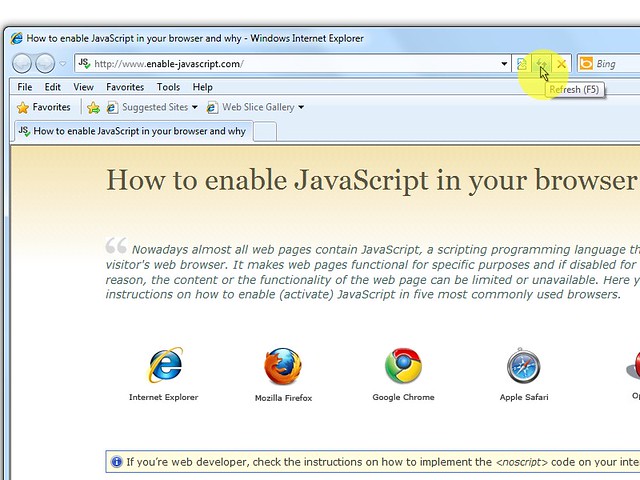
How to enable JavaScript in your browser


Nowadays almost all web pages contain JavaScript, a scripting programming language

that runs on visitor's web browser. It makes web pages functional for specific purposes

and if disabled for some reason, the content or the functionality of the web page

can be limited or unavailable. Here you can find instructions on how to enable (activate)

JavaScript in five most commonly used browsers.


javascript enabled JavaScript is enabled in your web browser. If you disable JavaScript, this text will change.


Developer

Instructions for web developers


You may want to consider linking to this site, to educate any script-disabled users

on how to enable JavaScript in five most commonly used browsers. You are free to

use the code below and modify it according to your needs.


<noscript>
For full functionality of this site it is necessary to enable JavaScript.
Here are the <a href="http://www.enable-javascript.com/" target="_blank">
instructions how to enable JavaScript in your web browser</a>.
</noscript>


On enable-javascript.com we optimize the script-disabled user experience as much

as we can:


  • The instructions for your browser are put at the top of the page

  • All the images are inlined, full-size, for easy perusing

  • This developer-centric message is out of the way


We want your visitors to have JavaScript enabled just as much as you do!


Firefox

Mozilla Firefox


  1. In the address bar, type about:config and press Enter.

  2. Click "I'll be careful, I promise" if a warning message appears.

  3. In the search box, search for javascript.enabled

  4. Toggle the "javascript.enabled" preference

    (right-click and select "Toggle" or double-click the preference) to

    change the value from "false" to "true".


Internet Explorer

Internet Explorer


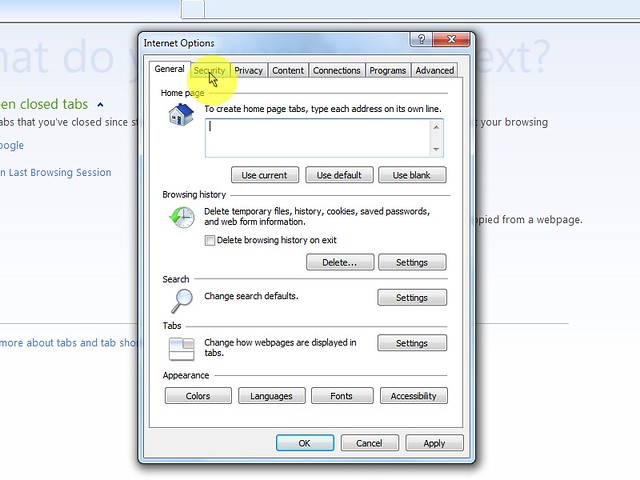
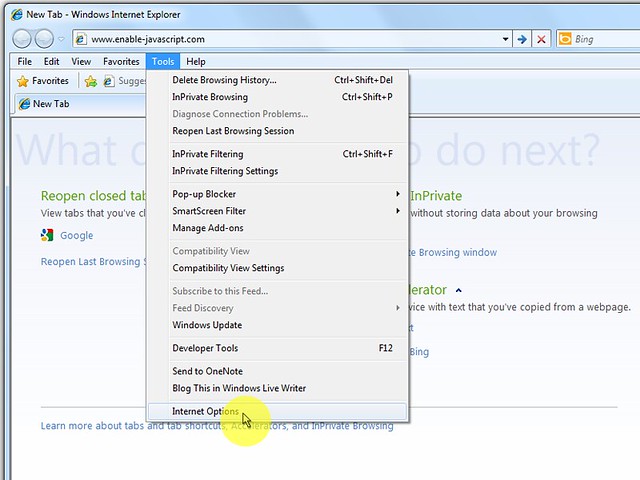
  1. On web browser menu click "Tools" menu and select "Internet Options".

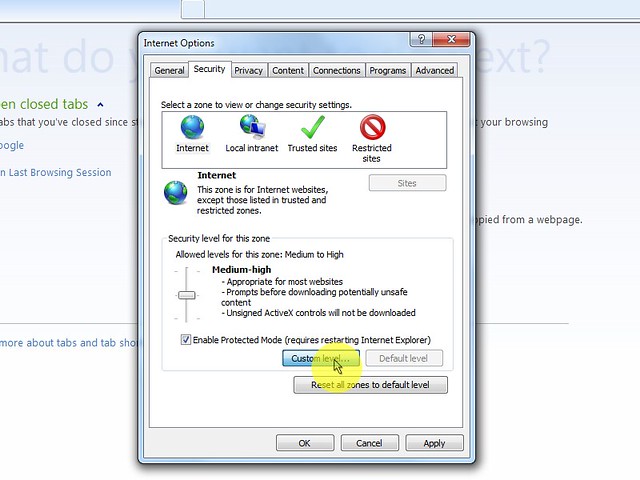
  2. In the "Internet Options" window select the "Security" tab.

  3. On the "Security" tab click on the "Custom level..." button.

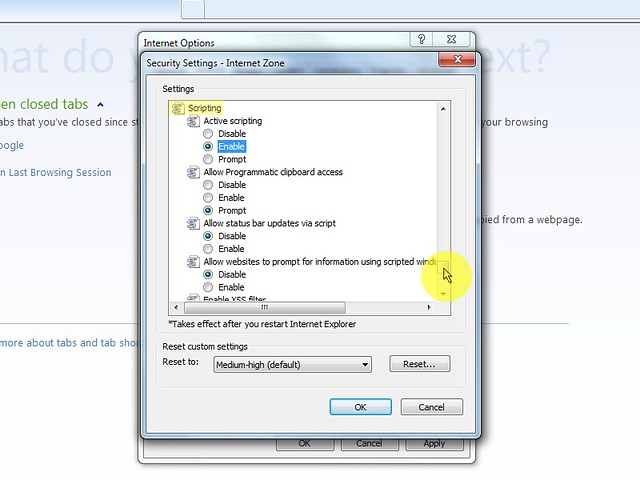
  4. When the "Security Settings - Internet Zone" dialog window opens, look

    for the "Scripting" section.

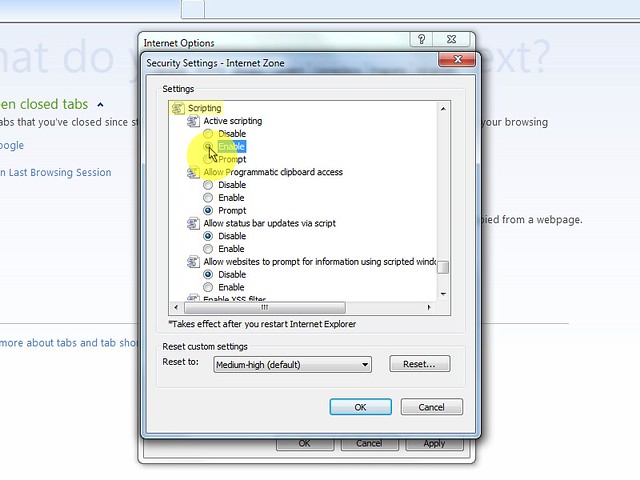
  5. In the "Active Scripting" item select "Enable".

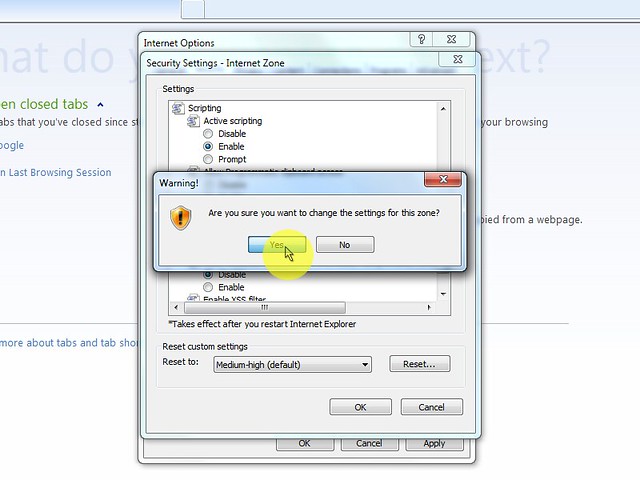
  6. When the "Warning!" window pops out asking "Are you sure you want

    to change the settings for this zone?" select "Yes".

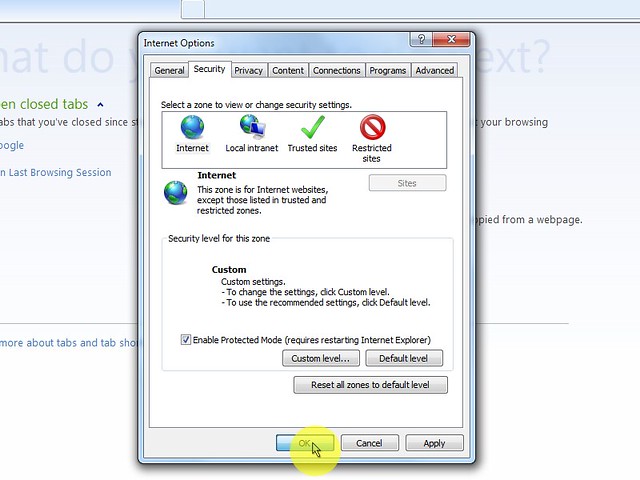
  7. In the "Internet Options" window click on the "OK" button to

    close it.

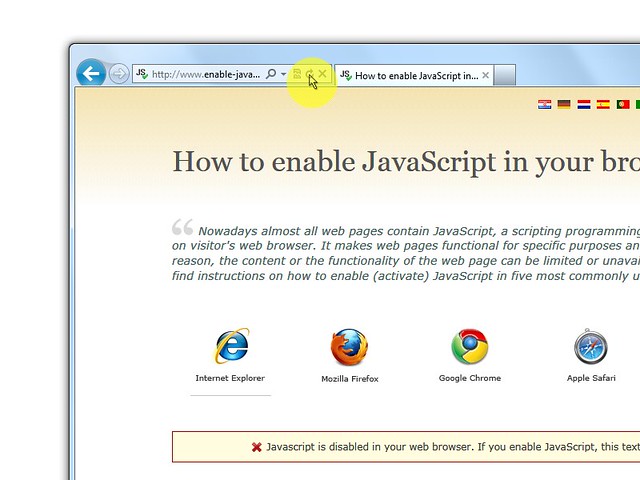
  8. Click on the "Refresh" button of the web browser to refresh the page.


    1.   2.   3.   4.   5.   6.   7.   8.


      Internet Explorer < 9

      Internet Explorer < 9


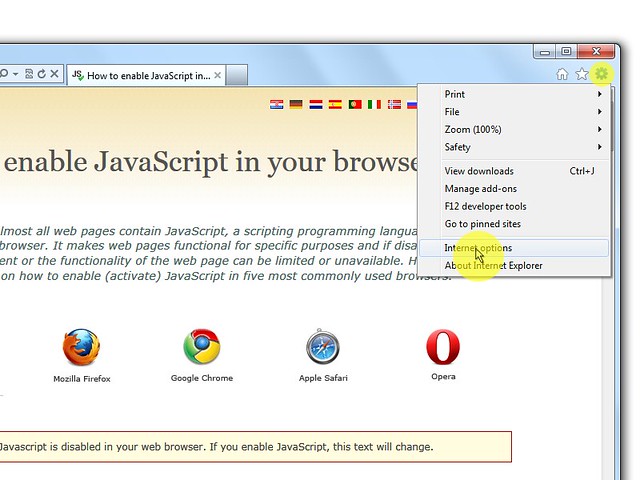
      1. On web browser menu click "Tools" and select "Internet Options".

      2. In the "Internet Options" window select the "Security" tab.

      3. On the "Security" tab click on the "Custom level..." button.

      4. When the "Security Settings - Internet Zone" dialog window opens, look

        for the "Scripting" section.

      5. In the "Active Scripting" item select "Enable".

      6. When the "Warning!" window pops out asking "Are you sure you want

        to change the settings for this zone?" select "Yes".

      7. In the "Internet Options" window click on the"OK" button to

        close it.

      8. Click on the "Refresh" button of the web browser to refresh the page.


        1.   2.   3.   4.   5.   6.   7. 8.


          Firefox < 23

          Mozilla Firefox < 23


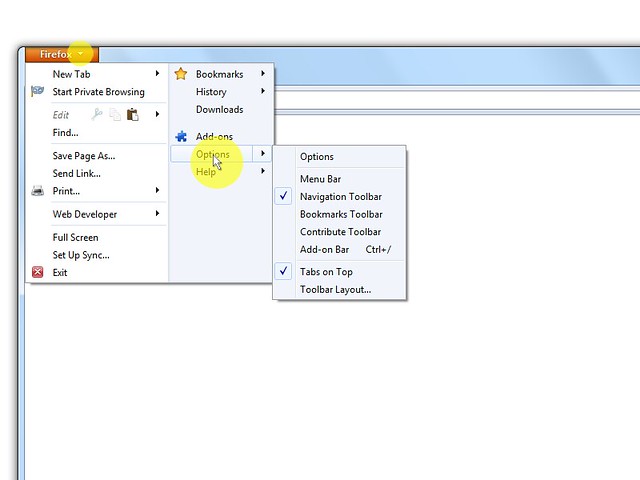
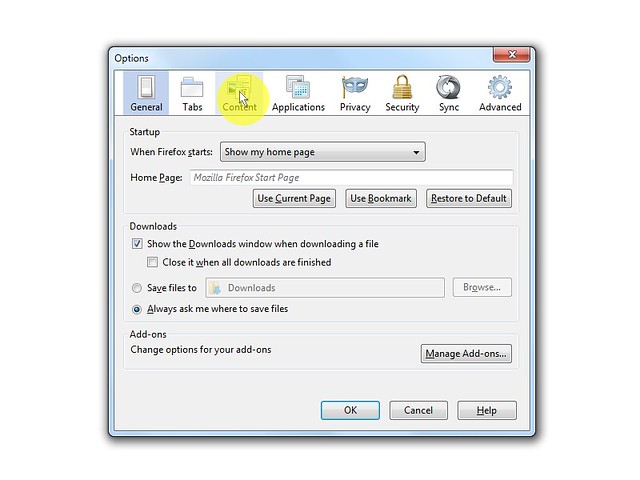
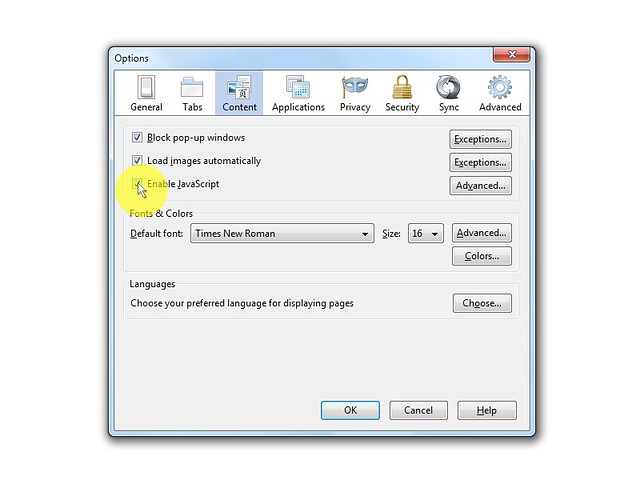
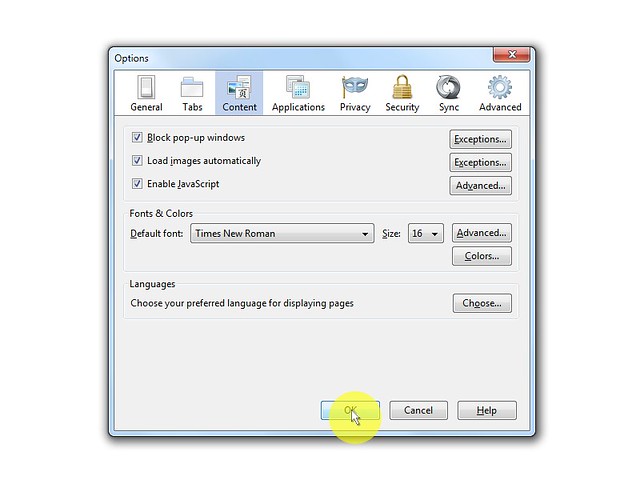
          1. On the web browser menu click "Tools" and select "Options".

          2. In the "Options" window select the "Content" tab.

          3. Mark the "Enable JavaScript" checkbox.

          4. In the opened "Options" window click on the "OK" button to close

            it.

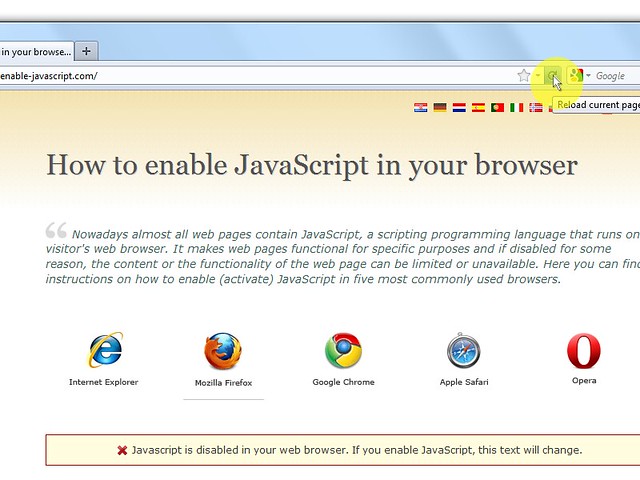
          5. Click on the "Reload current page" button of the web browser to refresh

            the page.


          1.   2.   3.   4.   5.


          Chrome

          Google Chrome


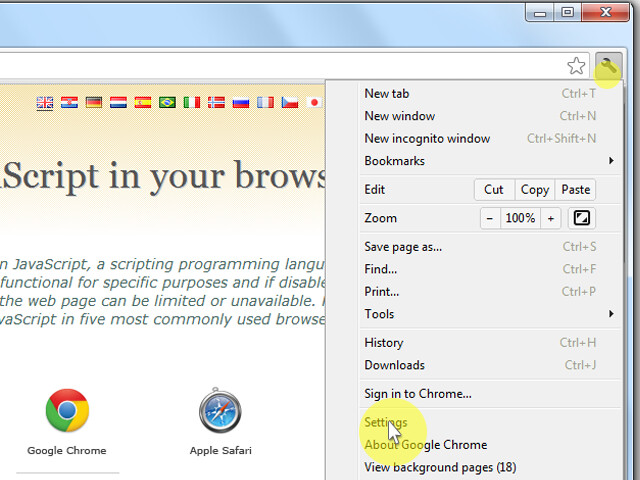
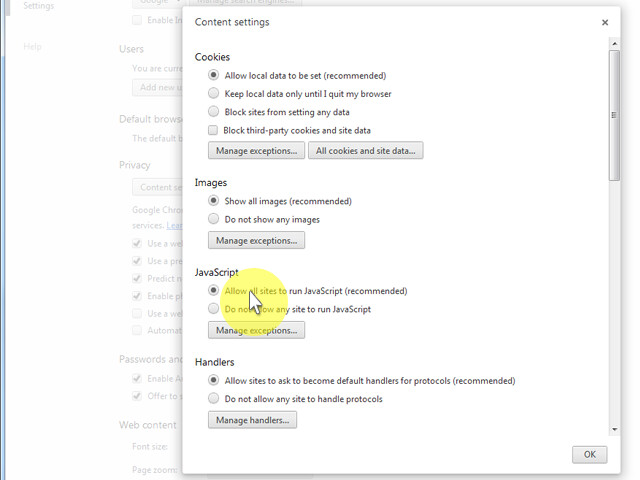
          1. On the web browser menu click on the "Customize and control Google Chrome" and select "Settings".


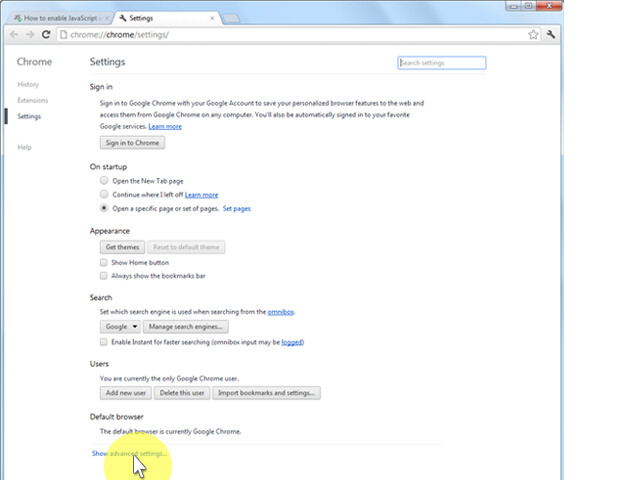
          2. In the "Settings" section click on the "Show advanced settings..."


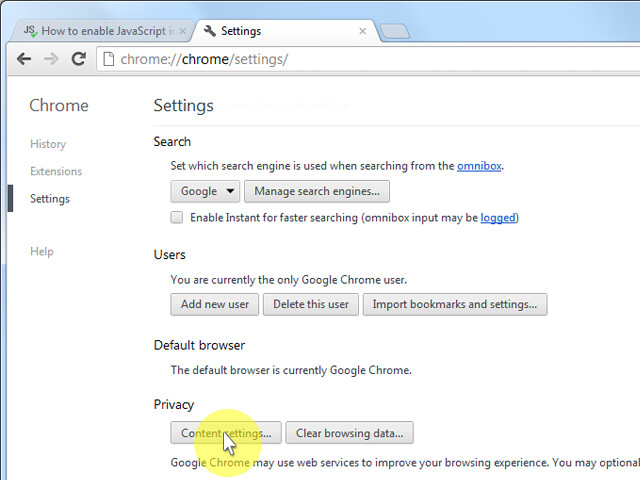
          3. Under the the "Privacy" click on the "Content settings...".


          4. When the dialog window opens, look for the

            "JavaScript" section and select "Allow all sites to run JavaScript

            (recommended)".


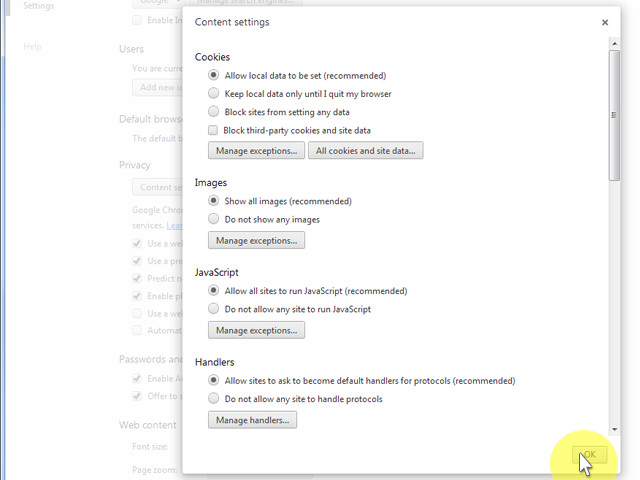
          5. Click on the "OK" button to close it.


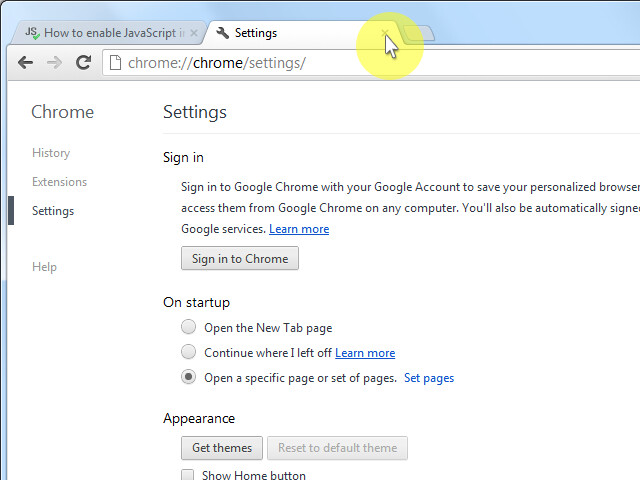
          6. Close the "Settings" tab.


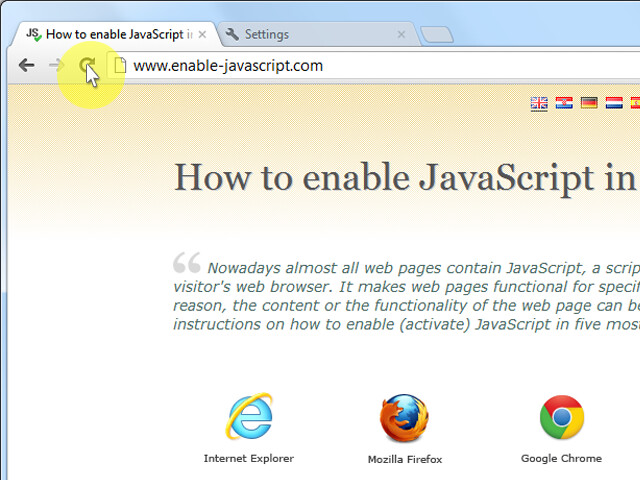
          7. Click on the "Reload this page" button of the web browser to refresh the page.


            1.   2.   3.   4.   5.   6.   7.


              Safari

              Apple Safari


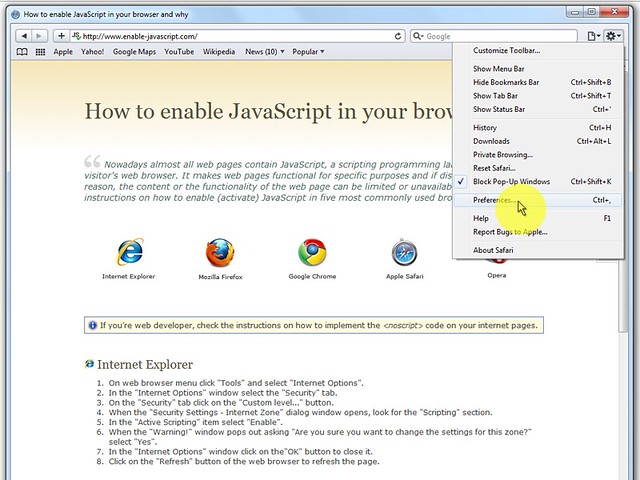
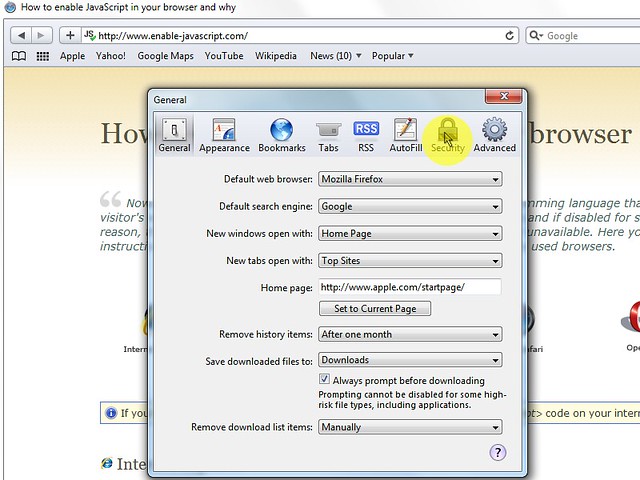
              1. On the web browser menu click on the "Edit" and select "Preferences".

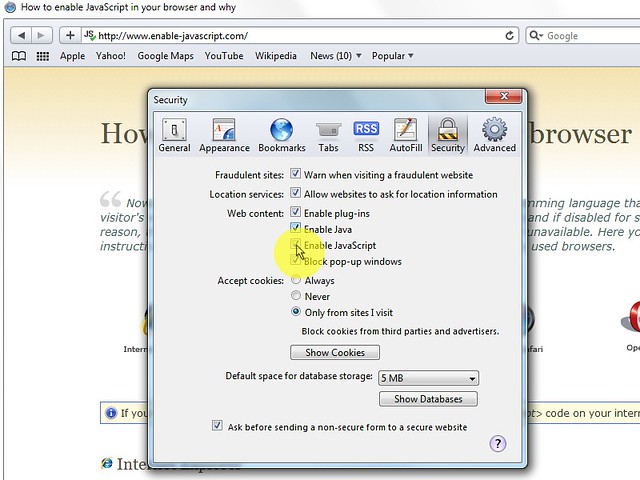
              2. In the "Preferences" window select the "Security" tab.

              3. In the "Security" tab section "Web content" mark the "Enable

                JavaScript" checkbox.

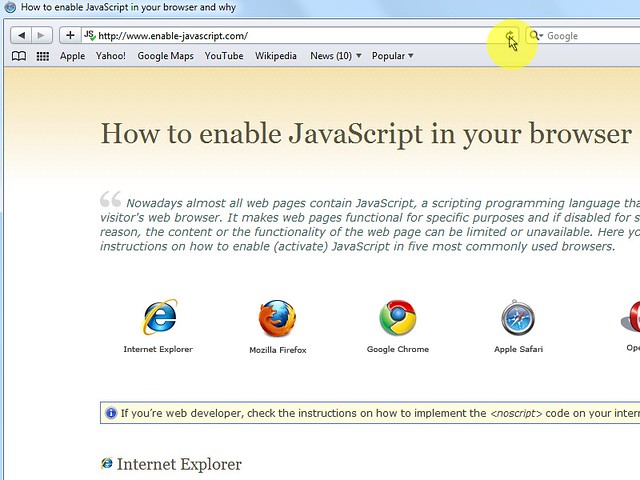
              4. Click on the "Reload the current page" button of the web browser to refresh

                the page.


                1.   2.   3.   4.


                  Opera

                  Opera


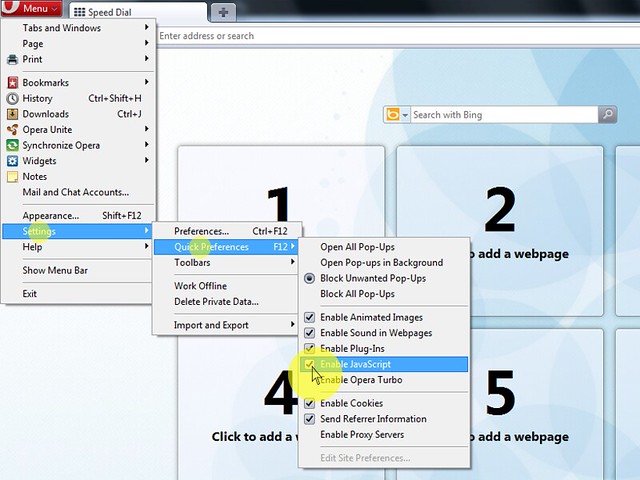
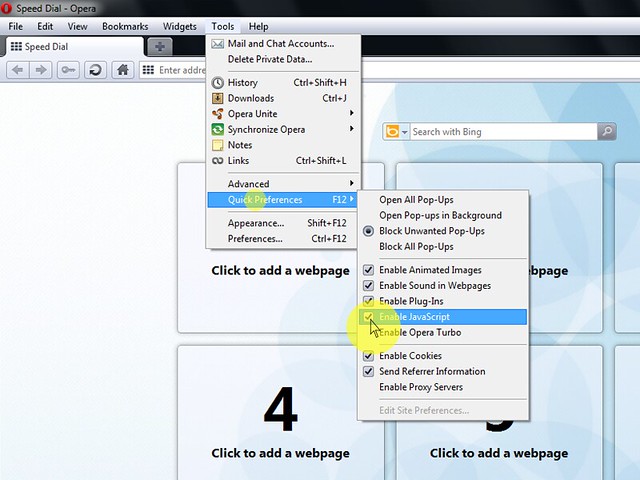
                  • 1. a) Click on "Menu", hover mouse on the "Settings" then hover

                    mouse on the "Quick preferences" and mark the "Enable JavaScript"

                    checkbox.

                  • 1. b) If "Menu bar" is shown click on the "Tools", hover mouse

                    on the "Quick preferences" and mark the "Enable JavaScript"

                    checkbox.


                  1. a)  1. b)  opera10 b


                  Opera < 10

                  Opera < v. 10


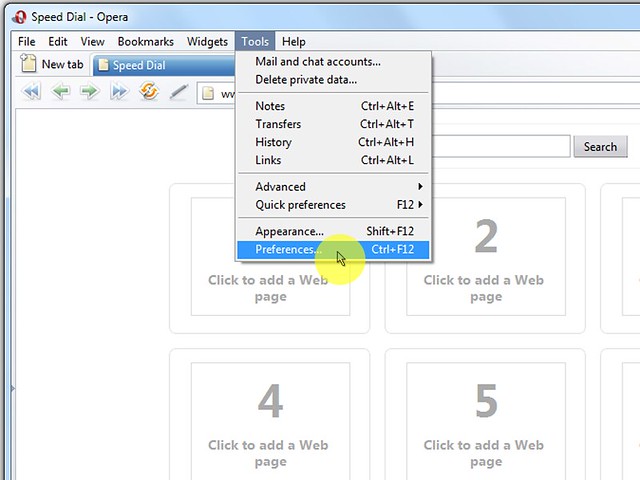
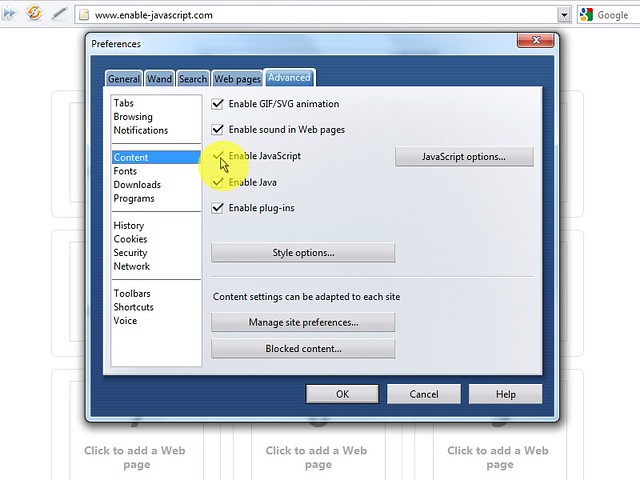
                  1. On the web browser menu click "Tools" and select "Preferences".

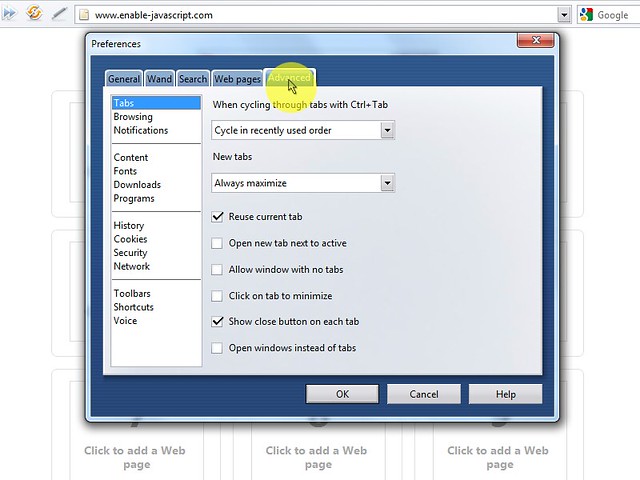
                  2. In the "Preferences" window select the "Advanced" tab.

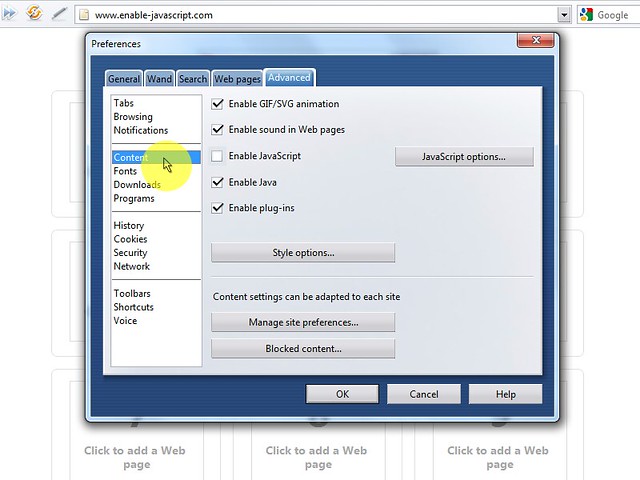
                  3. On the "Advanced" tab click on "Content" menu item.

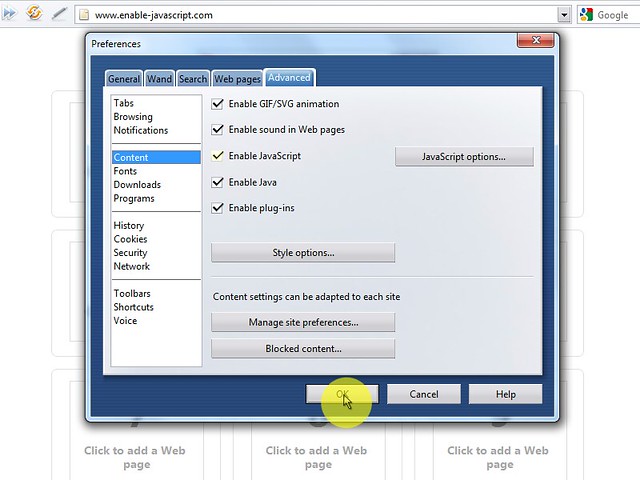
                  4. Mark the "Enable JavaScript" checkbox.

                  5. In the opened "Preferences" window click on the "OK" button

                    to close it.

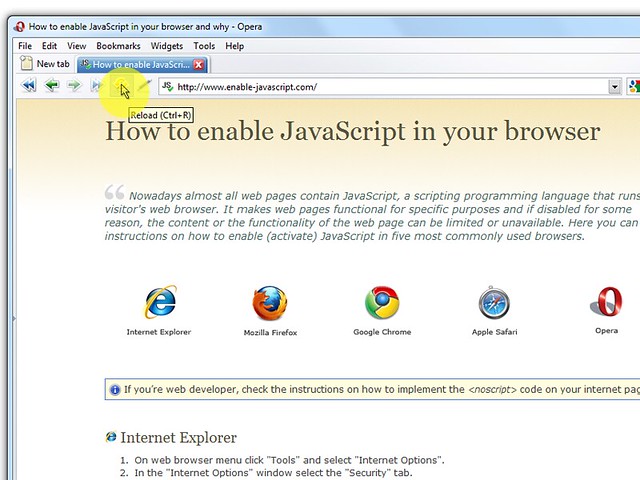
                  6. Click on the "Reload" button of the web browser to refresh the page.


                    1.   2.   3.   4.   5.   6.


                      Epson - drivers &amp; downloads

                      Epson - drivers & downloads


                      http://download.ebz.epson.net/dsc/du/02/DriverDownloadInfo.do?LG2=EN&CN2=SG&CTI=4&PRN=Stylus+Photo+R230&OSC=WS


                      Download

                      Javanen van SuriNAME in Nederland


                      iframe width 480 height 270 src https://www.youtube.com/embed/9wBtYrAvI2w frameborder 0 allowfullscreen> /iframe>

                      Rabu

                      SSC Service Utility for Epson Stylus Printer


                      SSC Service Utility


                      for Epson Stylus Printers.


                      Main features.


                      SSC Service Utility allow you to do many amazing things with Your Epson printer

                      :


                      1) Work directly with CSIC in Epson Stylus printers cartridges.


                      2) Reset or rewrite any chip using special addon device.


                      3) Freeze internal ink counters.


                      4) Reset internal ink counters even with empty cartridges.


                      5) Separate cleaning of color and black heads for all Epson inkjet printers,

                      powerful cleaning mode.


                      6) Hot swapping of cartridges supported.


                      7) Resetting of protection counter (even then it is already full).


                      8) More then 100 different Epson printers supported


                      This allow many people with high printing demands to save some money (program

                      works with both black and color cartridges).


                      Up to day this software works under Windows 95/98/ME/2K2/XP

                      with both the LPT and USB printers.


                      NOTE ! You can lost Epson lifetime guarantee on print head by refilling

                      ink cartridges!


                      Latest versions changes:


                      New in 4.30:


                      - support for R270


                      - support for R240


                      - support for R340


                      - support for CX2800


                      - support for CX3900


                      - support for CX4900


                      - support for CX5900


                      - support for C58/C59


                      - support for RX640


                      - improved support for C2100/2200


                      - improved support for RX700


                      - improved support for R2400


                      - improved support for 785EPX/825/895/915


                      - some other improvements and bug fixes


                      New in 4.20:


                      - support for CX4200/CX4700/CX4800/DX4200/DX4800


                      - support for C47/C48


                      - support for RX430


                      - support for CX6500/CX6300


                      - improved support for CX6400/CX6600


                      - improved support for RX500/RX510


                      - improved support for RX600/RX610


                      - improved support for R1800


                      - improved support for CX3700/CX3800/DX3800/DX3850


                      - improved support for C67/C68/D68


                      - improved support for C87/C88/D88


                      - many new chip models supported


                      - some other improvements and bug fixes


                      New in 4.10:


                      - support for PM-970C


                      - support for PictureMate


                      - support for RX700


                      - support for R2400


                      - support for PM-A700


                      - support for PM-G720


                      - support for RX520


                      - support for CX7800


                      - support for CX4100


                      - support for DX3800


                      - support for CX3800/CX3810


                      - support for CX3700


                      - support for C67/68 and Photo Editions


                      - support for C87/C88/D88 and Photo Editions


                      - support for R220/R230


                      - support for R320


                      - support for CX4500


                      - support for CX3650


                      - various bug fixes


                      New in 4.00:


                      - ability to work with additional reset device


                      - support for CX4600


                      - support for CX5300


                      - support for CX5100


                      - support for RX420


                      - support for RX425


                      - support for RX620


                      - support for R1800


                      - improved support for almost all other printers


                      - improved ink freezer


                      - improved ink monitor, implemented status information


                      - protection counter reset improvements


                      - various bug fixes


                      Full version history is in the help file included in distribution.


                      Supported printer models >>>


                      Please, read all instructions in help file before doing anything with

                      Your printer!


                      Please, post filled test report form generated by the program (test report

                      button) to us in case of any software problem or if Your printer is unsupported

                      by this software (read instructions how to make test report in this case

                      in help file) !


                      Program screenshots:


                      This menu can be accessed by right clicking on the

                      application icon located in tray.


                      NOTE!


                      1) This is freeware project, so it is illegal to take money for this software.


                      2) Distribution of this software from any site other then www.ssclg.com or

                      one of our official partners sites is prohibited!


                      (с) 2002-2007 SSC Localization Group


                      Send your test reports and support requests (with reports) to this e-mail


                      You can discuss software in

                      this forum
                      .


                      End user agreement


                      1) This software is provided "as is" without any express or implied

                      warranty of any kind including, without


                      limitation, warranties of merchantability, non-infringement or fitness for any

                      particular purpose.


                      2) You are liable for all risks in relation to the quality or performance of

                      this software. In no event shall SSC Localization Group or personally, author

                      of this software, be liable for any damages whatsoever caused to you or the

                      third party arising out of the use or inability to use this software. Damages

                      include general damages, special damages, accidental damages or consequential

                      damages (including, without limitation, loss of data or accuracy or unfitting

                      interface for other programs, or problems with peripheral equipment).


                      2) You understand the risk of whole head or individual nozzles clogging in

                      case of tardy replacing of empty cartridges, as well as risk of using hot swapping

                      function (this include frequently cartridges replacement, or wrong deblocking

                      of parking head on some models). You understand, that resetting the ink level

                      counters or using ink freezer function implies responsibility to carefully watch

                      ink levels in all cartridges and timely (as soon as You see any raw white bands,

                      even in one color) replace cardridge.


                      I agree with all above

                      statements and want to download software (v4.30)